
Amazon Subscribe & Save Price Increases and How to Spot Them
Why an Amazon Subscribe & Save price increase happens after you subscribe, where it shows on the product page, and how to get an alert when it rises.

A Subscribe & Save price is not fixed on the day you sign up. Amazon's Subscribe & Save help page(opens in a new tab) says the price of the item "may decrease or increase between deliveries". An Amazon Subscribe & Save price increase needs nothing to go wrong with the discount: the percentage can stay the same while the price under it moves. This post shows where the increase comes from on a real product page, what Amazon's reminder email tells you, and how to get an alert when the price rises, while there is still time to act.
The short version: a Subscribe & Save price is a percentage off the item's current one-time price. It is a discount, not a fixed price, so it climbs whenever the one-time price climbs. Track that one-time price with AlarmBot, a free Chrome extension, and set the "Any increase" rule. The alert reaches you by browser push, email, Telegram or Discord.
Why a Subscribe & Save Price Goes Up After You Subscribe
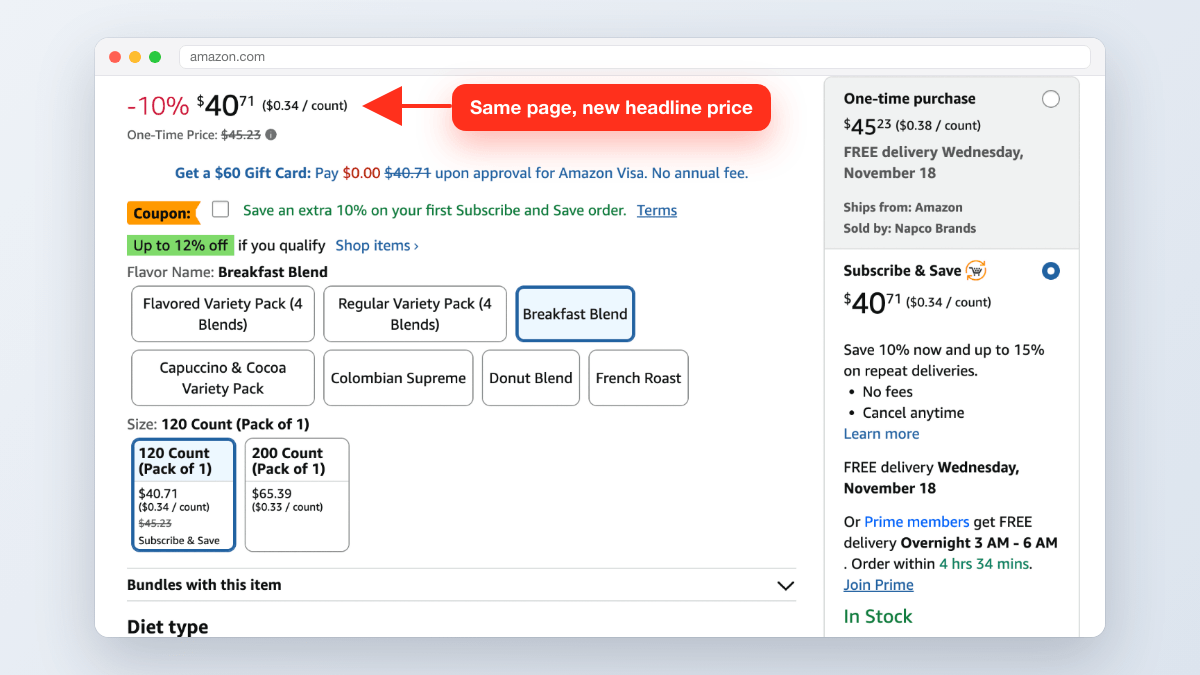
Subscribe & Save sells a discount, and the discount is taken from a price that moves. On November 13, 2026, the Amazon.com page of a 120-count box of coffee pods showed two prices in its buy box: "One-time purchase $45.23" and "Subscribe & Save $40.71". Select the second row and the headline price changes to "-10% $40.71", with "One-Time Price: $45.23" struck through beneath it. The info icon beside that line explains the struck-through number: "The 'One-time Price' refers to the current Featured Offer price for a one time purchase of the item."
The percentage has two parts. Amazon's page for sellers says "Amazon funds a 5% discount on Subscribe & Save orders of five items or more" and that a seller can fund a further 5% or 10% (Sell on Amazon(opens in a new tab)). The one-time price belongs to whoever sells the item: in Amazon's words, "independent sellers set their own prices" (About Amazon(opens in a new tab), updated July 2026).
Take the page above: 10 percent off $45.23 is $40.71. If the one-time price rose to $49.99, the same 10 percent would give $44.99. The discount is the same at both ends. The number under it moved.
The Email Before the Charge Is One Look at the Price
Amazon sets the price of each order ahead of time. Its Subscribe & Save help page(opens in a new tab) puts it this way: "The item price and any applicable discount for your order is calculated before your reminder email." The reminder is where that price reaches you. An AlarmBot track alerts on a different event: the price on the product page changing.
Amazon describes its own price alert with buying targets: "Set a price alert for when this face cream is $75" (About Amazon(opens in a new tab), updated October 2026). A subscriber needs the opposite alert: tell me when the price of something I already buy goes up. AlarmBot has a rule for exactly that, "Any increase", and it checks the page as often as every 20 minutes on the free plan.
One Product Page, Four Prices
That Amazon.com page, a 120-count box of coffee pods, carried four numbers a buyer could end up paying, and its headline showed only one of them.
| Where on the page | What it showed on November 13, 2026 |
|---|---|
| Headline price | $45.23, the one-time price |
| Buy box, second row | Subscribe & Save $40.71 |
| Coupon line under the price | "Apply 10% coupon", a checkbox that neither price includes |
| Size buttons | 120 Count $45.23 ($0.38 / count), 200 Count $65.39 ($0.33 / count) |
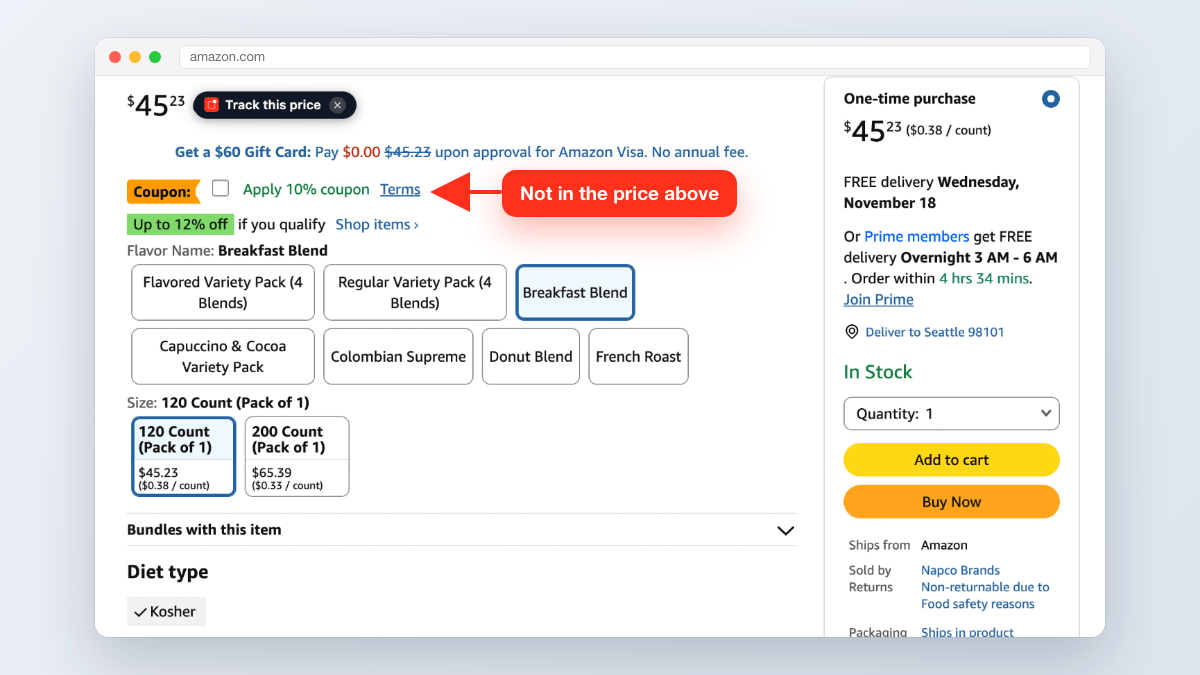
Two of these matter when you watch a price. The coupon is a separate layer with its own clock: its terms listed an expiry date of November 20, 2026 and warned that "collected coupons may expire before the Expiry Date". With the Subscribe & Save row selected, the coupon line changed to "Save an extra 10% on your first Subscribe and Save order", so it applies to the first order only. And every size has its own price, so choose flavor and size before you track anything. The back-in-stock guide explains why the variant comes first.
Track the Price Your Next Delivery Will Use
The number to watch is the one-time price, because the Subscribe & Save price is taken from it. With the AlarmBot extension installed in Chrome and a free account connected, tracking it takes one click on the product page.
- Open the product page and pick your flavor and size. Leave "One-time purchase" selected, the way the page loads.
- Click the badge next to the price. AlarmBot shows a "Track this price" badge beside the headline price, or "Connect & track" if the extension isn't connected yet. It reads "Creating…", then "Tracking!".
- Add the "Any increase" rule. In your panel, open the track's Alert Rule and choose "Any increase". To hear about bigger jumps only, use "Rises above" with a price or "Rises by" with a percentage.
- Add the Subscribe & Save price itself for the exact figure. Click the AlarmBot icon, choose Start Selecting, click the Subscribe & Save price in the buy box and confirm with Create Track. AlarmBot follows this one as text. Give it the "Doesn't equal" rule with the price you subscribed at, and the alert fires when the page shows anything else, a changed discount included.
- Choose where the alert lands. Browser push, email, Telegram or Discord; the Telegram and Discord setup guide covers the last two.
Checks run in your own Chrome, signed in to your Amazon account, so AlarmBot reads the page the way you see it. Every change is recorded with its date, and the free plan keeps 90 days of history, enough to see whether a price creeps up between deliveries. We track Amazon product pages with AlarmBot ourselves. Picking elements and writing rules are covered in the price drop alerts guide.
Example Coffee Pods, 120 Count
https://www.amazon.com/
Price ranged from $38.99 to $45.99 across 6 recorded changes. The advertised reference price was $38.99. An alert was sent on September 3, 2026, when the price moved to $40.49.
Common Questions
Can an Amazon Subscribe & Save price go up after I subscribe?
Yes. Amazon's Subscribe & Save help page(opens in a new tab) says the price "may decrease or increase between deliveries". The Subscribe & Save price is shown as a percentage off the item's current one-time price, so it rises when that price rises. On the product page checked for this post on November 13, 2026, it was $40.71 against a one-time price of $45.23, a 10% discount.
How do I get an alert for an Amazon Subscribe & Save price increase?
Click AlarmBot's "Track this price" badge next to the price on the product page and add the "Any increase" rule in your panel. When the one-time price behind the discount goes up, the alert arrives by browser push, email, Telegram or Discord.
Is the coupon included in the Subscribe & Save price?
Not on the page checked for this post. The headline price and the Subscribe & Save price were both shown without the 10% coupon, which was a separate checkbox with its own expiry date.
Is AlarmBot free?
Yes. The free plan covers 20 tracks, checked as often as every 20 minutes, and 90 days of price history. No credit card is needed.
Watch the Price Under the Discount
A Subscribe & Save discount can hold steady while the bill grows, because the bill follows the one-time price. Put a track on that price, set "Any increase", and the next rise reaches you when it happens instead of in the reminder before the next delivery.
Brand, retailer and product names in this article are the trademarks of their respective owners and are used for identification and commentary only. AlarmBot is not affiliated with, endorsed by or sponsored by any company named.